Wednesday, 13 April 2016

BADI Add Header Tab Custom Fields in VA01,VA02,VA03 ( Sales Order ) with BAPI Extension

BADI                                                :  BADI_SLS_HEAD_SCR_CUS
Add field in following Table          :  VBAK
Add field in following structures :  (used for extension and Communication structure)
           BAPE_VBAK, BAPE_VBAKX, VBAKKOZ, VBAKKOZX

VBAK: 


BADI Implementation:

T-Code : SE18
Enter the BADI name  and click display


Expand BADI_SLS_HEAD_SCR_CUS

Right Click implementation


Below popup will be appeared and click create button.

Enter the enhancement name, description and press enter .

Enter the package name and create the Transport request.


Double click on your enhancement name, below screen will be appeared. Enter the implementation name , description and class name, then press enter or click tick mark.
 Below Screen will be appeared
 

Expand BADI implementation and double click on implementation class which one highlighted on below screen short.


Double click on methods and start writing on code like below.

method if_ex_sls_head_scr_cus~activate_tab_page.
  
data:ls_head_tab like line of ct_cus_head_tab.

    ls_head_tab
-head_caption = 'DPL Custom Fields'.        “Tab Description
    ls_head_tab
-head_program = 'ZDPL_CUS_TAB_SALES_ORDER'. “Program name
    ls_head_tab
-head_dynpro = '9000'.                      “Sub Screen Name
    
append ls_head_tab to ct_cus_head_tab.

endmethod.


Note:  1. No need to write any code for data transfer.
            2. Screen should be sub screen.

Sub Screen Details:


Result: 

Using BAPI to Update the filed:

BAPE_VBAK:

VBAKKOZ:

BAPE_VBAKX:
Note:  Use data element as CHAR1 , don’t use BAPIUPDATE .

VBAKKOZX:
Note:  Use data element as CHAR1 , don’t use BAPIUPDATE .


Extension Structure Code:

While updating custom fields through BAPI, need to use below code.

data: bape_vbak  type bape_vbak ,
     bape_vbakx 
type bape_vbakx .
data: extensionin type table of bapiparex with header line.
  bape_vbak-vbeln        = vbeln.  “For creation make it blank (vbeln)
  bape_vbak
-posnr        = posnr .
  bape_vbak
-zzpo_number  = ponum .
  bape_vbak
-zzgrpid      = grpid .

  bape_vbakx
-vbeln       = vbeln.  “For creation make it blank (vbeln)
  bape_vbakx
-posnr       = posnr.
  bape_vbakx
-zzpo_number = 'X' .
  bape_vbakx
-zzgrpid     = 'X' .

  
move 'BAPE_VBAK' to extensionin-structure.

  
call method cl_abap_container_utilities=>fill_container_c
    
exporting
      im_value     
= i_bape_vbak
    
importing
      ex_container 
= extensionin-valuepart1.
  
append extensionin to extensionin.
 
  move 'BAPE_VBAKX' to extensionin-structure.
  
move bape_vbakx to extensionin-valuepart1.
  
append extensionin to extensionin .


Append Structure in Standard Table or Structure


Step 1: Click append structure


Step 2: Click create button:

Step 3: Give the Structure name

Step4: Enter the fields, description and Active the structure.


Monday, 13 October 2014

GGB0 Validation using User Exit

User exit for FI Transactions using (GGB0)
 
TCODE   : GGB0 validation
                OB28  for activating validation
                GCX2   user exit Program Config
                GS01   Set Creation
Program : RGGBR000 user exit program
Step 1 : create custom program for RGGBR000
   1 .Create custom (ZRGGBR000) program , with the copy of  standard Program  RGGBR000 .

   2. Maintained user exit name with in form (form get_exit_titles tables etab ) .
 Exits-name = (user defined name)
  3. Create form for that new user exit .
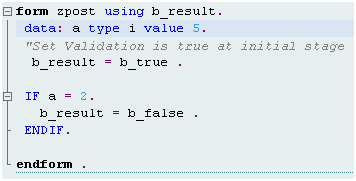
   form zpark using b_result.
         "Set Validation is true at initial stage
   b_result = b_true .
     “When your validation is unsuccessful just pass b_result in b_fales .
     * b_result = b_fales .
endform.      
Within form write your logic
Save and Activate the program .
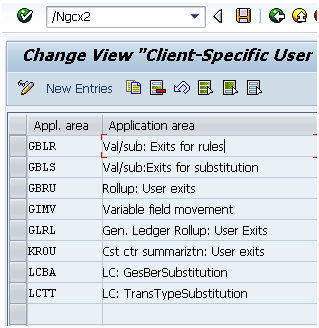
Step2 : Assign the Custom Program in GCX2
After Assigning , user exit name will be appear in GGB0 exit TAB .
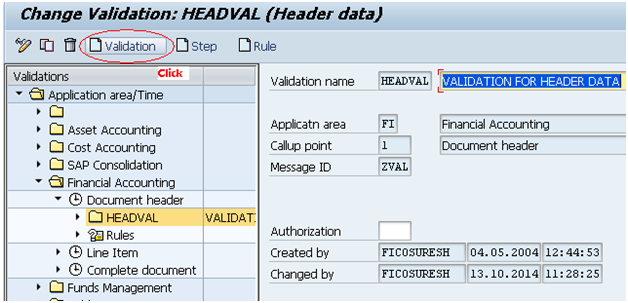
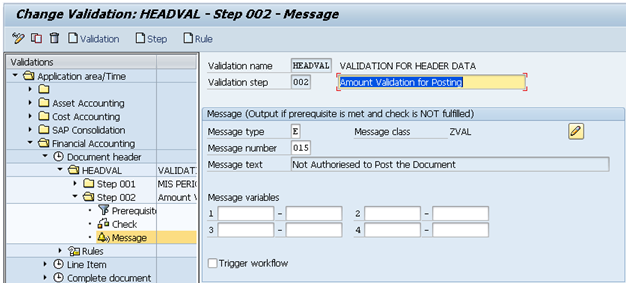
Step3 :  Create the Validation in GGB0 .
 
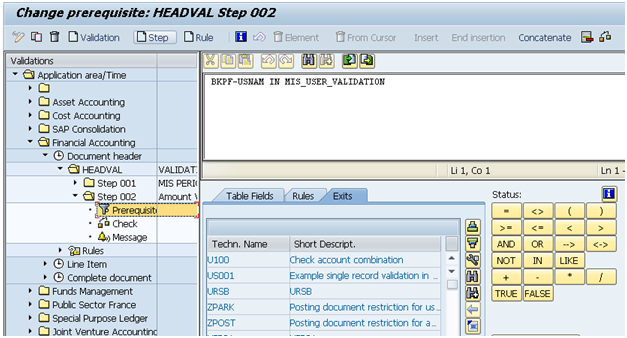
Maintained the User exit

Message:
Step:  Activate Validation (OB28) .

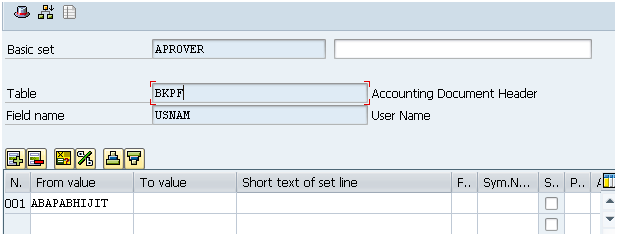
SET Creation (GS01 ) :
Press enter. Then below screen will appear .

Tuesday, 16 September 2014

BAPI - step by step creation


BAPI- Business Application Programming Interface

Step1: Creating a structure in SE11

Step2: Creating the function module in SE37
Step 3: Creating the business object in SWO1
Step 4: Viewing the created BAPI in BAPI Explorer
Step 5: Test your BAPI in SWO1


Step1: Creating a structure in SE11


Simple OOPS Concept ALV

*&---------------------------------------------------------------------*
*& Report  ZDEMO123
*&
*&---------------------------------------------------------------------*
*&
*&
*&---------------------------------------------------------------------*

report  zdemo123.

*----------------------------------------------------------------------*
*       CLASS local DEFINITION
*----------------------------------------------------------------------*
*
*----------------------------------------------------------------------*
class local definition .
 public section .
   data: it_bkpf type standard table of bkpf .
   types : r_belnr  type range of bkpf-belnr .
   methods:get_data importing belnr type r_belnr,
           fieldcat exporting e_fcat type lvc_t_fcat,
           build_alv importing i_fcat type lvc_t_fcat  .
endclass .                    "local DEFINITION

*----------------------------------------------------------------------*
*       CLASS local IMPLEMENTATION
*----------------------------------------------------------------------*
*
*----------------------------------------------------------------------*
class local implementation .

 method:get_data.
   select * from bkpf into table it_bkpf where belnr in belnr .
 endmethod .                    "get_data
 method fieldcat .

   call function 'LVC_FIELDCATALOG_MERGE'
    exporting
*      I_BUFFER_ACTIVE              =
      i_structure_name             = 'BKPF'
*      I_CLIENT_NEVER_DISPLAY       = 'X'
*      I_BYPASSING_BUFFER           =
*      I_INTERNAL_TABNAME           = IT_BKPF
     changing
       ct_fieldcat                  = e_fcat
    exceptions
      inconsistent_interface       = 1
      program_error                = 2
      others                       = 3  .

*    lc_fcat = e_fcat .
 endmethod .                    "fieldcat


 method: build_alv .
   data lo_grid type ref to cl_gui_alv_grid.
   data: c_fcat type lvc_t_fcat .
   create object lo_grid
     exporting
       i_parent = cl_gui_custom_container=>screen0.
   c_fcat = i_fcat .
   call method lo_grid->set_table_for_first_display
     changing
       it_outtab                     = it_bkpf
       it_fieldcatalog               = c_fcat
     exceptions
       invalid_parameter_combination = 1
       program_error                 = 2
       too_many_lines                = 3
       others                        = 4.

 endmethod .                    "build_alv

endclass .                    "local IMPLEMENTATION

data: obj_local type ref to local.
data: cfcat type lvc_t_fcat .
tables: bkpf .

select-options : s_belnr for bkpf-belnr .
selection-screen begin of screen 1001 .
selection-screen end of screen 1001.

start-of-selection .


 create object obj_local .

 obj_local->get_data( exporting belnr = s_belnr[] ) .
 obj_local->fieldcat( importing e_fcat = cfcat ) .

 obj_local->build_alv( exporting i_fcat = cfcat ) .

 call selection-screen 1001 ."STARTING AT 8 8 ENDING AT 85 22.

Thursday, 29 May 2014

F4 HELP FOR YEAR / SEARCH HELP FOR YEAR

PARAMETERS: p_year TYPE gjahr .


AT SELECTION-SCREEN on VALUE-REQUEST FOR p_year .

 TYPES: BEGIN OF ty_year ,
       year TYPE gjahr,
       END OF ty_year .
 data: it_year TYPE STANDARD TABLE OF ty_year WITH HEADER LINE .
        DATA: i_return TYPE ddshretval OCCURS 0 WITH HEADER LINE,
      c TYPE c VALUE 'S',
      year TYPE gjahr .

      year = sy-datum+0(4) .

DO 50 TIMES.
it_year-year = year .
append it_year .
SUBTRACT 1 FROM year .
ENDDO.

  CALL FUNCTION 'F4IF_INT_TABLE_VALUE_REQUEST'
    EXPORTING
      retfield    = 'P_YEAR'
      dynpprog    = sy-repid
      dynpnr      = sy-dynnr
      dynprofield = 'crid'
      value_org   = c
    TABLES
      value_tab   = it_year
      return_tab  = i_return.